Product and Requirements
Non-Functional Requirements: What Quality the System Needs
How to turn vague wishes such as "fast", "reliable" or "secure" into quality requirements with a scenario, a measurement boundary, a threshold, a method…
A correct answer does not yet mean the product can be used. A page may open slowly, a form may be unusable from the keyboard, and a confirmed booking may vanish after a restart. Non-functional requirements describe the properties of a system that matter to people and to the team, together with the conditions under which those properties can be checked.
This unit covers speed, reliability and service availability, scaling, security, privacy, interface accessibility, compatibility and maintainability. Not every product needs the same bar. A requirement should come from a real scenario, risk or obligation, not from the word "fast" or "reliable".
"Non-functional" does not mean "secondary" or "outside functionality". A functional requirement describes what the product does; a quality requirement describes under what conditions, for whom and to what level it must do it. Both are needed: a product can give the right answer, but too slowly or to the wrong users.
Acceptance criteria and evidence showed how to describe a correct result and what evidence to check it with. Here we carry the same approach over to speed, reliability, protection and ease of use. For example, "the client can reschedule a booking" describes behaviour; "an authorised client changes an upcoming booking, the new time appears in their account, and the request completes within two seconds on supported browsers" adds access, context and the quality of the response. The two seconds are a teaching assumption here, not a universal norm.
After this unit the reader can:
- link quality to a specific need or risk;
- tell latency, throughput, availability and data durability apart;
- name the condition, the response, the measurement boundary and the verification method;
- mark assumptions and trade-offs without presenting them as measured facts;
- demand evidence without letting a criterion be quietly weakened for the sake of a green status.
Quality answers "for whom, under what conditions, and with what consequence?"
"Fast", "reliable", "secure" and "easy to use" have no self-sufficient numerical meaning. How many requests arrive at once? Who has the right to see the data? Can the main action be completed without a mouse? What does success mean when a third-party service is down? The answers change decisions, so they should not be hidden behind an adjective.
A practical form for a quality requirement:
When [condition, role, data state and load], after [event or action], the system must [respond observably], and we verify the property [by a method, in an environment, with a unit and a period]. If [a limit is reached or something fails], the system [expected safe outcome].
This is not a mandatory template for every sentence, but a way of noticing what is missing. A requirement can be a table, ordinary text or a set of linked criteria; what matters is that the team understands in the same way what is being measured and what decision it will take based on the result.
Don't define a need by a technical solution. "Put in Redis" doesn't explain why a cache is needed; "add three more servers" doesn't specify the load; "support all browsers" doesn't define "all". Start with the scenario, constraint or risk, and only then choose how to implement it.
Quality attributes can conflict: a cache speeds up the catalogue but may show a stale price; retrying a request helps after a brief failure but increases load; a form may be easy to use with a mouse but inaccessible from the keyboard. "More of every metric" does not mean better. Record which benefit the requirement protects, and at what cost.
Speed: measure what the user experiences
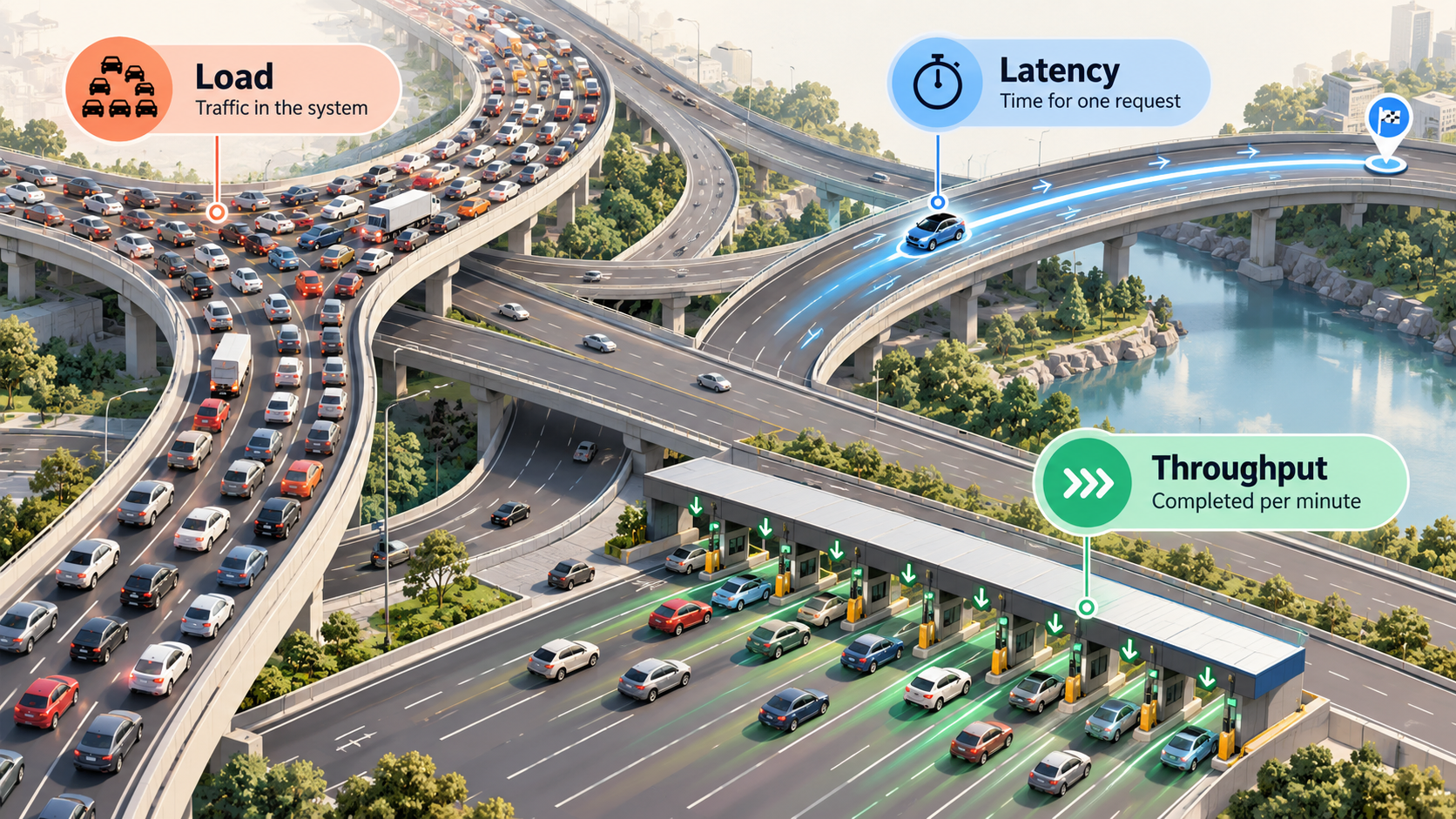
Latency is the time from a recorded starting event to a defined completion. From here on, times are given in milliseconds (ms); 1,000 ms is one second. For the user, it might be the time from pressing "Search" to a useful result appearing; for the server, from receiving the request to sending the response. These are different boundaries: between them lie the browser, the network, a queue, a gateway, the database or a third-party service. Google's site reliability engineering (SRE) guidance recommends choosing an indicator with the user's experience in mind, and calling server-side time an approximation if it does not measure that experience directly (Service Level Objectives).
Throughput is the amount of work the system completes per unit of time, such as requests per second or records per minute. It is not the same as latency: a system can complete many independent requests in parallel yet respond slowly to each one, or respond quickly to a single request yet fail to cope with a stream of them. Load is the specific work arriving at the system. More concurrent requests often increase latency, and beyond a certain point it can degrade sharply; so latency should be measured together with a description of the workload profile, and one quick individual request does not prove the service can handle a stream.
First define the measurement boundary. A person may wait from pressing a button until a finished result appears, while the server measures only the time it spent processing the request. Loading the page, querying the database and getting a response from an external service are different segments. State where the timer starts and stops, and for which scenario that matters.
Describe the load by the type and frequency of actions, concurrency, data size, the proportion of reads and writes, peaks and the duration of the scenario. "A thousand users" is not an adequate description: they might arrive one at a time over a day, or all press "Pay" in the same minute.
Load also depends on the state of the process and the cache. A cold start is the first request after a restart or after scaling up from zero, while the environment is initialising; a warm request reaches a process that is already ready. A cold cache is a separate state: the process is running, but the data it needs has not yet been loaded. If these scenarios occur on the production path, measure them separately, because otherwise a mixed sample will hide where the latency actually comes from.
The average hides the slow tail
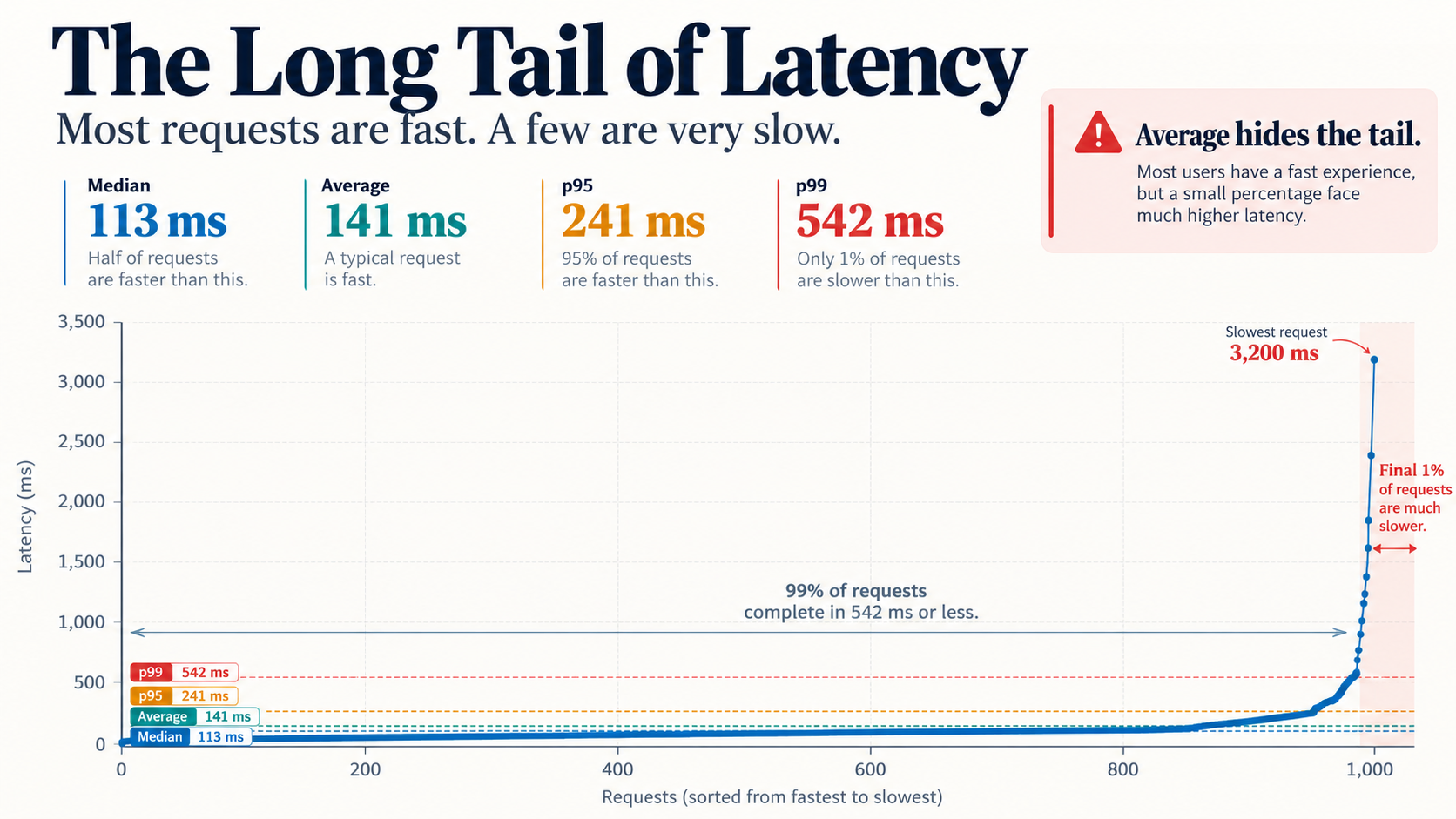
Imagine 1,000 hypothetical requests to check free booking slots (an arithmetic example, not a measurement of a real product): 940 took 100 ms each, 50 took 250 ms each, and 10 took 2,000 ms each. The mean is 126.5 ms and the median is 100 ms. Both numbers look acceptable, even though ten people waited two seconds. Using the nearest-rank method, the median corresponds to the 500th observation and p95 to the 950th: the 940th request took 100 ms, and the next ten already took 250 ms each. So p95 is 250 ms, yet one per cent of people waited two seconds. There are several ways to compute percentiles, and for small samples they can give different results (NIST: Percentiles).
| Number of requests | Time per request | Total time |
|---|---|---|
| 940 | 100 ms | 94,000 ms |
| 50 | 250 ms | 12,500 ms |
| 10 | 2,000 ms | 20,000 ms |
| Total | 1,000 observations | 126,500 ms |
The mean is the total time divided by the number of observations. It is useful for some questions about resources, but it does not describe the experience of the slow minority. The median, or p50, splits the ordered observations in half; p95 is the value not exceeded by roughly 95% of measurements under the recorded method. The rest may be much slower.
A percentile depends on the sample, its size, the calculation method, the load and the timer boundary. Compare like-for-like scenarios and record the method. The sample must be large enough and resemble the expected work; a handful of requests says nothing about the long tail at peak.
Define the latency of successful responses and the proportion of successful attempts separately. If p95 is computed only over correct responses, errors and timeouts never enter its sample, and slow timeouts can hide behind a good p95. Alongside latency, record the proportion of all valid requests that completed correctly before the deadline: errors and timeouts count as failed attempts, they are neither excluded nor counted as zero, and the time to the deadline is recorded in the error report. The two indicators answer different questions: how fast a successful request is answered, and how often a person gets a correct result. If the latency metric includes failed attempts, decide in advance what time is assigned to them. Twenty requests say little about the tail; at the same time, a large sample collected at the wrong time or along the wrong path may be answering the wrong question.
In the browser, Navigation Timing and Resource Timing help measure individual parts of loading a page and its resources (MDN: Navigation Timing, Resource Timing). These timestamps help locate a slow segment, but on their own they don't show when the result became useful to a person.
For a generative system, the time to the first visible fragment of a response differs from the time to full completion. Streaming can show the beginning earlier, but it does not necessarily shorten the full wait or improve correctness. Time also depends on the length of the input and the output, the chosen model, the streaming mode and other parts of the request; OpenAI and Anthropic advise measuring the aspect you need rather than assuming a universal threshold (OpenAI, Anthropic). Shortening the generated text can reduce waiting, but a truncated answer is not a success if the person needs the full explanation. Before agreeing a threshold, define what counts as completion: a list may be usable before a decorative image has loaded, whereas an animation that quickly confirms a payment is not completion if the outcome of the operation is still unknown. The threshold should come from a need, a contract or an owner's decision, not from whichever number is convenient to measure.
Reliability: what the system does when something fails
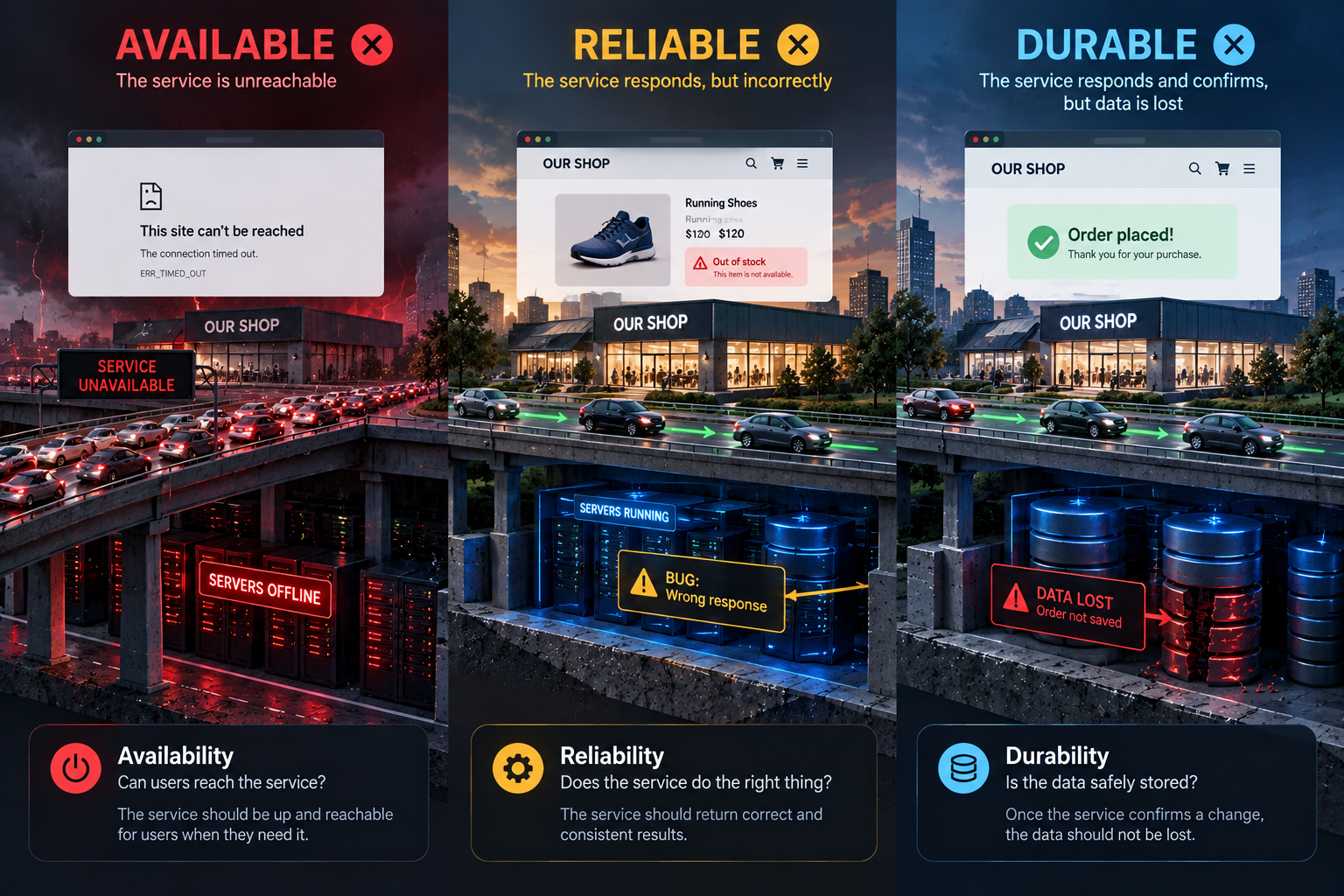
Reliability describes whether the system consistently does the work required of it and whether the team can restore it after an error. It covers not only uninterrupted server operation but also correct answers, safe handling of retries, data recovery and a clear action when a dependency is unavailable.

Service availability is the proportion of a defined time, or of requests, during which the key action can be completed successfully. The condition must say whether a response with wrong data, an unacceptable delay, or the failure of only some functions counts as an error. Durability is the probability that confirmed data will be preserved over a defined period. A storage system may temporarily stop responding without losing a record; or it may respond now and lose confirmed changes after a failure. Google SRE treats availability and durability as separate indicators for storage systems (Service Level Objectives).
Availability can also be counted in minutes of uptime or as the proportion of successful requests over a period. These are different denominators and different perspectives; the criterion must define which one it uses. Don't call a system available if it returns a success code but doesn't perform the key action. A small service may choose a single database for simplicity, but a failure will stop work until it is restored from a backup; a standby node can shorten some outages at the cost of extra spending, replication and failover. Redundancy does not automatically protect against accidental deletion or a failed migration, so the acceptable downtime and the acceptable amount of data loss must be agreed.
Failures are often partial: the database may be working while the notification service is not; one payment provider may fail while the rest of the product is available. For reads, it is sometimes safer to show the last confirmed data and mark it as possibly stale. For example, a cached price speeds up the catalogue and reduces calls to the supplier, but it may no longer match the current price. Before payment, the price and availability must be reconciled with the source; if that check is unavailable or the value has changed, do not confirm the old amount (IETF RFC 9111, §4.2). For writes, it may be necessary to refuse, so as not to confirm an operation twice. An automatic retry sometimes helps after a transient error, but it can increase load or perform an irreversible action again. Define which operations are safe to retry and how to detect that they have already happened.
During a network partition, the system may be unable to guarantee both that every node is available and that all of them see the same up-to-date data. If two nodes each see the same last free slot, independent confirmation can create a double booking. For that write, the system can temporarily refuse confirmation until it can reach the source of truth; for browsing the catalogue it can allow reads of a copy marked as stale, because the consequence is different. This decision depends on the operation; it is not a rule that "consistency always matters more" (Google SRE: Managing Critical State).
A degraded mode is a limitation defined in advance under which the product keeps part of its usefulness during a failure. It must say honestly what isn't working, must not call stale data current, and must not claim that an unfinished action has taken place.
Google SRE practice distinguishes three notions (Service Level Objectives):
- SLI (service level indicator): a measurable indicator, such as the proportion of successful requests;
- SLO (service level objective): a target for that indicator over a defined period;
- SLA (service level agreement): a contractual commitment, which may set consequences for failing to meet it.
The number "99.9%" is not a promise on its own: it needs a period, a definition of success, a source of measurement and rules for errors. An SLO helps the team choose between working on new features and working on reliability; an SLA needs the agreement of the parties and can have financial consequences.
Scaling: define what exactly is growing
Scalability is the ability to handle growing work at acceptable cost and complexity. What grows may be the number of requests, the number of users, the volume of data, the frequency of imports or the size of the team. Vertical scaling adds resources to one machine; horizontal scaling adds more machines or worker nodes. The second option raises extra questions about shared state, request distribution, retries, consistency and diagnostics.
Before adding nodes, measure the load profile and find the bottleneck. Separate reads and writes: a catalogue may have many views and few changes, while payments have few operations but a high cost of error. A daily average will hide a short peak. Another server will not speed up a slow query to the database or to an external provider. Test the hypothesis on a reproducible scenario: change one dataset size or the number of concurrent reads, and compare p95, errors, storage query time and cost. Record the exact configuration of every run, or you will be comparing different conditions.
Don't design for millions of concurrent users without a confirmed need. Vertical scaling can be a simple first step, but it is limited by the physical capacity of one machine and by the price of resources. For an internal portal with a few dozen bookings a day, a single database may be simpler and cheaper; however, the failure of that machine may stop work until it is restored from a backup. A separate node in an independent zone can shorten the outage after certain kinds of failure, but it adds cost, replication and failover that has to be tested. Redundancy does not automatically protect against accidental deletion or a failed migration, so backups and recovery need a separate requirement. The owner weighs the cost of availability against the consequences of downtime and agrees the acceptable recovery time and the acceptable amount of data loss; see also the reliability section above and AWS Well-Architected: Availability. Books about data-intensive systems and architectural trade-offs are useful as a map of questions about load, latency, failures and complexity, not as a recipe for a mandatory database or number of services (Kleppmann and Riccomini, Designing Data-Intensive Applications, 2nd ed., Ford et al., Software Architecture: The Hard Parts).
The number of services on its own says nothing about scalability. Separate components can help when they need to be released or loaded independently, but the network adds latency and partial failures. Boundaries and their cost are examined in detail in architectural thinking.
Security and privacy: define what you are protecting
Security protects the system, its data and its actions from unauthorised access, modification, disclosure or disruption. Privacy determines what data about a person the product collects, what it uses it for, whom it shows it to, how long it keeps it and when it deletes it. An encrypted store can be secure, yet the product may still collect data it does not need.
For each critical requirement, name the data and actions being protected, the permitted roles, the threats and the expected response to failure. Decide which records are needed for diagnostics and audit, and which fields must never end up in logs. Agree retention and deletion periods, and the owner of access to secrets.
To make the requirement complete, check:
- which data and actions must be protected;
- which roles may perform which operations;
- where access is checked and what must fail safely;
- which logs are needed for diagnostics and audit;
- what must not be written to logs or error messages;
- which retention period and deletion process apply;
- where, and under what rule, secrets are issued and stored;
- how the team proves that the control works.
Secrets are passwords, keys, tokens and other values that grant access to a resource. They are not embedded in code, the repository, a container image, the command line, a prompt to an agent, ordinary logs or error messages. The requirement should explain who receives the secret and for which action, how it is passed to the system, who can read or change it, how it is revoked and replaced, and what to do if a leak is suspected. During rotation, dependent services must be taken into account so that the replacement does not interrupt work.
For an integration with an external system, a diagnostic record may contain the operation identifier, the time and the response code, but not the authorisation header, a body containing the token, or an error fragment that includes the secret. Check that the token is absent from the code and the build artefacts, and that the process has only the permissions it needs. If the environment does not yet have an approved secret store, record this as a security blocker and agree an interim process; do not disguise the secret in code or notes. For a local prototype without real credentials, a test value may be used, but a production token must not be carried into the example. OWASP recommends restricting access and controlling the lifecycle of secrets (Secrets Management Cheat Sheet); the implementation depends on the platform and the threat model.
For example, a service passes confirmed bookings to an external system using a token. The token must be available only to the integration process, and must not end up in a prompt to an agent, a log or the text of an error. For diagnostics it is enough to record the operation identifier, the time, the type of result and the response code; there is no need to log the request body or the authorisation header. In the event of a leak, the team must know who revokes the token and how to create a new one without losing records that have already been confirmed.
Break this requirement down into verifiable steps: the process has only write permission to the space it needs, and receives the secret through the agreed store or a platform mechanism, not from the repository or the command line; the logs contain the operation identifier, the time and the response code, but not the authorisation header, a body with the token, or an error fragment that repeats it; the responsible role can revoke the token, issue a replacement and check the access log. Check the source code and the build artefact for the secret, make a controlled failing request and compare the log, and demonstrate that the process does not need an account with broader permissions. If there is no approved store yet, that is a security blocker and a question for the responsible specialist; do not disguise the secret in code or notes. For a prototype without real credentials, a test value is enough.
The OWASP Application Security Verification Standard (ASVS) offers a catalogue of requirements and ways of verifying technical controls, not automatic proof of security or legal compliance (ASVS 5.0.0). The team chooses requirements according to its data, threats and product context.
Interface accessibility is part of quality
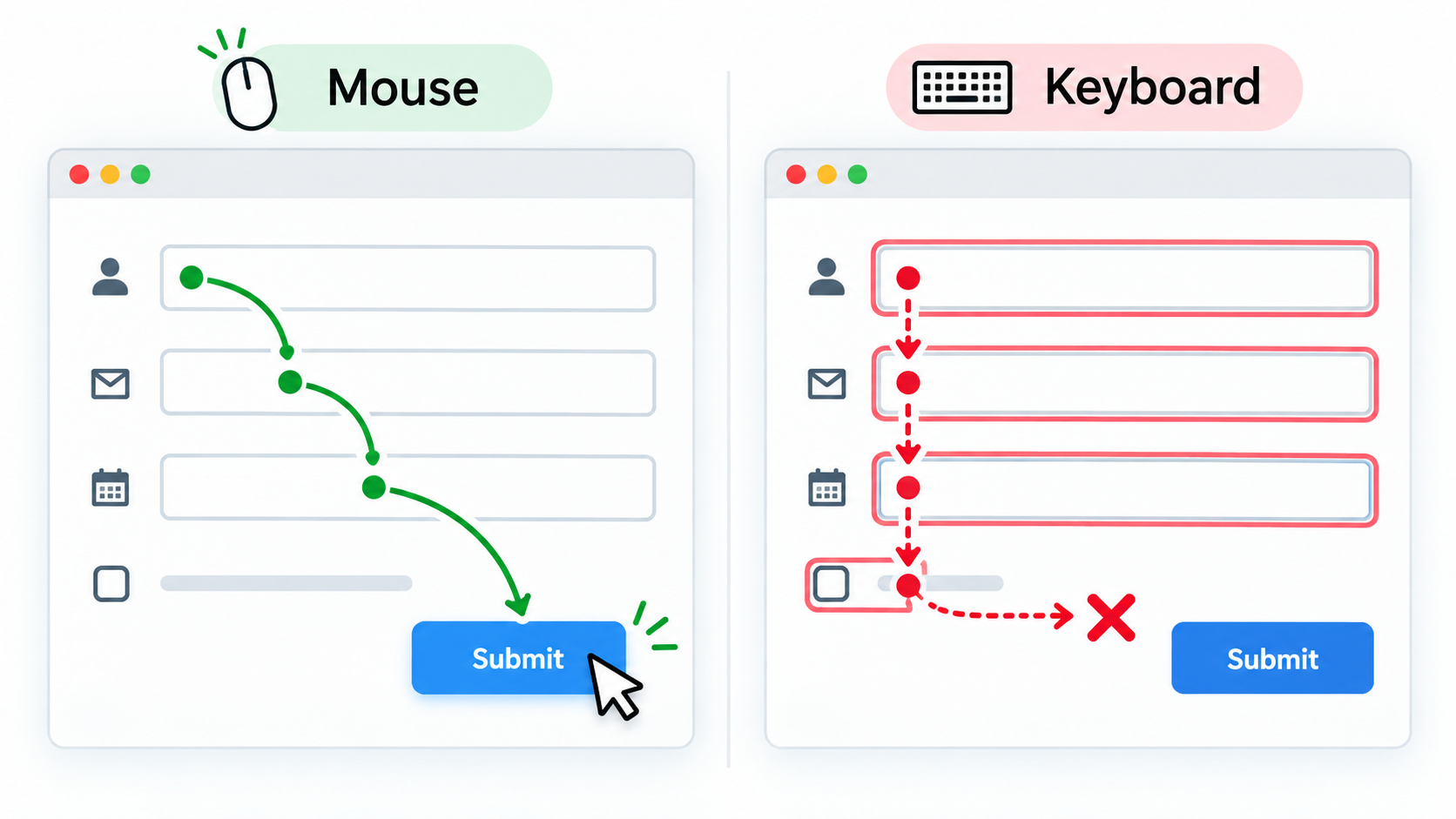
Usability is about how easily a person understands and completes a task. Interface accessibility is about whether people with different abilities of perception and interaction can use the product, including without a mouse, with a screen reader, with magnification or with other settings. The two are related, but neither proves the other: a simple screen can have an invisible keyboard focus, and a technically accessible one can still have confusing navigation.
For example, a booking form has the fields "Name" and "Email address" and a "Confirm" button. Every element can be activated with a mouse, but Tab skips the button, and after an invalid email address only a red border appears, with no explanation. A keyboard user cannot complete the action, and a person who cannot distinguish colours doesn't know what to fix. WCAG 2.2 (the Web Content Accessibility Guidelines), maintained by the W3C (World Wide Web Consortium) through its Web Accessibility Initiative (WAI), sets testable criteria: keyboard operation (2.1.1), visible focus (2.4.7) and identifying errors in text (3.3.1) (WCAG 2.2, Keyboard, Focus Visible, Error Identification). Check that the whole form can be completed with the Tab key, the semantics of interactive elements, focus visibility, the error text, zoom and the assistive technologies that matter. An automated scan finds only some defects, so it does not prove that a person can complete the full scenario.
Don't add requirements about colours or components without need. Define what action the person must perform and how to confirm the accessibility of that particular scenario. If the product is obliged to conform to WCAG, name the target level and the product boundaries you are checking; the full key path must be walked through using the required modes of interaction, including the keyboard and assistive technology.
| Situation | Expected behaviour | Check |
|---|---|---|
| A person completes the form without a mouse | Tab moves logically through fields, links and buttons; the activation key performs the action of the focused element | Walk through the whole scenario and record the order and availability of the controls |
| Focus is on an element | The current field or button has a distinct visible focus outline | Check keyboard movement in the supported themes and zoom levels |
| The email address has an invalid format | The text names the field and the reason; the error can be found without guessing from colour | Submit an invalid address and check the message, the focus and the announcement by assistive technology |
The criteria depend on the scenario and the target conformance level. Don't promise "full accessibility" without a defined boundary and evidence. A technical metric also does not confirm value or clarity: check whether the person found their confirmed booking and was able to reschedule it. This applies Cagan's product framework and Krug's approach of observing navigation; it is not a rule about some particular p95 (Cagan, Krug).
Compatibility: name the supported environment

Compatibility is the product's ability to work in defined environments and interoperate with the required formats and versions. These may include browsers and operating systems, screen width, the API version, the locale, the time zone, the date format, the text encoding, import files and the mobile app version. "Works everywhere" cannot be checked. Choose the supported environment based on the audience, the contract and the risk, and record exact versions or a support rule, such as the last two major versions of the browsers the audience uses. Don't infer compatibility merely from the home page opening: an important operation may depend on a different browser feature or format.
Time and data formats often hide compatibility problems. "By the end of the day" needs a time zone; the date 04/05 may mean 4 May or 5 April. For CSV (comma-separated values, a plain-text tabular format with delimiters), agree on UTF-8 encoding, the delimiter, quoting and the date format, along with an example of valid and invalid input. Test non-Latin text such as Cyrillic and a comma inside quotes, not just a simple file (Unicode: UTF-8 FAQ).
Example: a report grows with the catalogue
Imagine an internal booking catalogue that grows from 500 to 50,000 records. This is a teaching example. Staff filter the catalogue rather than downloading the whole table; times are shown in the office time zone, and the data can be exported as CSV.
| Property | Refined criterion | Evidence and maintenance signal |
|---|---|---|
| Growth | On a set of 50,000 records, with 20 concurrent reads and a defined mix of filters, p95 stays within the agreed limit; the query loads only the page that is needed | Repeat the same scenario on a small and a large dataset; record latency, errors and storage query time |
| Compatibility | CSV in UTF-8 with a fixed delimiter and headers; dates are unambiguous and converted to the office time zone for display | Import Cyrillic text, a comma inside quotes and a date near midnight; check the supported browsers |
| Observability | Each export has an identifier, a row count, a duration and a summary; personal fields are not logged | Check the success and error logs, find the operation and confirm that sensitive data is absent |
| Maintainability | The team reproduces an import error on a synthetic file and can roll back to the previous parsing rule | Keep a sample file, the reproduction steps, the rule's owner and the rollback path |
In a teaching run, p95 might, for example, rise from 180 to 920 ms along with storage query time. That is a hypothesis for diagnosis, not proof of a cause: the query plan, the index and the load profile are checked separately. If the browser shows a different date near midnight, that is a defect in the time rule, not a latency problem. The numbers here are not measured properties of a real product.
Maintainability and observability

Maintainability describes whether the team can understand the system, change it safely, detect a problem and restore service without disproportionate cost. Check it with concrete questions: can a failure be reproduced from the documented steps? Is it clear who is responsible for a component? Can a change be deployed safely and the previous state restored?
Observability lets you draw conclusions about the internal state of a system from its signals. Logs describe events, metrics show numerical changes over time, and traces link the steps of a single request across components. OpenTelemetry defines these as separate telemetry signals (Signals). More data is not always better: logs cost money and can expose personal data or secrets. Collect enough to find a failure, but don't log everything indiscriminately.
For logs, define the required fields, the level of detail, the retention period, access rights and forbidden values. For metrics, name the unit, the distribution, the source and how often they are reviewed. For recovery you can set the acceptable amount of confirmed data that may be lost and the time to restore a function, but these targets must be agreed by the product owner and the operations team. A small internal application may need nothing more than structured logs, error notifications and a recovery runbook; a critical payment system may need monitoring, tracing, on-call rotation and a disaster recovery plan. The level is set by the consequences of failure, the load, the team and the budget.
A full example: the catalogue updates prices once an hour
A shop receives prices and stock levels from a supplier once an hour. A cache is a temporary copy of data that is reused instead of going to the source on every view. A cache can speed up the page and reduce the load on the supplier, but it lengthens the time during which a shopper sees a stale value. This is a trade-off between speed, freshness and the availability of a dependency. In HTTP, the max-age directive sets how long a response is considered fresh; after that, revalidation may be needed (MDN: HTTP caching).
The team has not yet confirmed that the price really changes only once an hour. All the numbers below are teaching assumptions, not recommended thresholds:
| Question | Initial assumption | What needs confirming |
|---|---|---|
| When does the supplier change the price? | No more than once an hour | Does it send an event for an early change, or only a scheduled file? |
| How stale may the catalogue be? | Up to 60 minutes | Does that limit work for a sale, or for an item with low stock? |
| What is the source of truth at the moment of purchase? | The price is re-checked before confirmation | What happens if the check is unavailable or the amount has changed? |
| How is the stale state shown? | Show the time of the last successful update once the limit is passed | Can the item still be bought, and who decides when the data is too old? |
| What latency should we promise for browsing? | Catalogue p95 ≤ 700 ms under a defined load | Does this matter to users, and over what period should it be measured? |
Different criteria follow from these answers:
- Freshness: store the time of the last confirmed value; once the agreed limit has passed, do not call the price current without a caveat.
- Catalogue reads: measure p95 of correct responses, from the browser's request to the price appearing, on the agreed dataset, load and environment; separately count the proportion of all valid requests that completed correctly before the deadline. Errors and timeouts are failed attempts.
- Order confirmation: re-check the price and stock; if the amount has changed, show it and ask the shopper to confirm, rather than silently charging a different amount.
- Supplier failure: keep the last confirmed value, show its age to the responsible role, and retry at a bounded interval set by the operational policy; don't mark the old copy as fresh.
The decision can differ between products. For an ordinary item, a cached view is acceptable; for an item with a volatile price, a re-check before payment is required; for an item that is out of stock, reporting the absence accurately matters more. Before reaching for cache invalidation, another server or an event queue, check precisely these product-relevant conditions.
Verification and evidence. On a fixed test dataset, record the base price, the time it was received and the time of the next update. Check ordinary browsing before and after the agreed freshness limit, an early price change by the supplier, a failed hourly update, missing stock, and a repeated request after a timeout. During checkout, separately change the price between viewing and confirming: the shopper must see the new amount and confirm it, and the system must not silently charge a different one. Keep the source and cache timestamps, the supplier's response, the retry log, the state shown to the shopper and the result of the re-check. If the data is old or the supplier is unavailable, the evidence is an honestly displayed age and a safe purchase decision, not merely a low catalogue p95.
How to describe a quality requirement
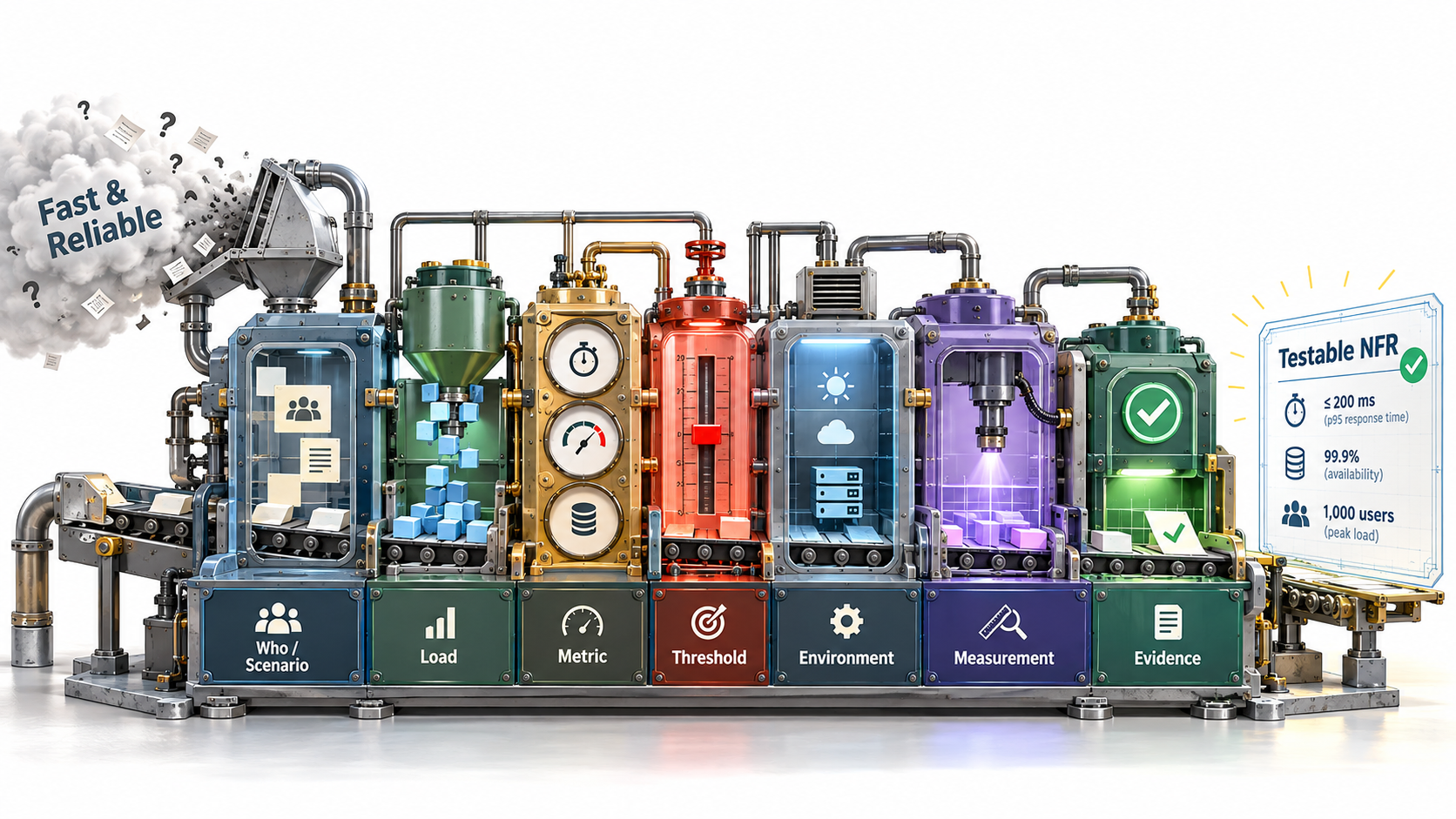
General criteria, methods of verification and evidence are covered in detail in acceptance criteria and evidence. For a non-functional property it is especially important to record:
| Field | What to record |
|---|---|
| Quality and reason | Which need or risk the requirement protects |
| Scenario | Who performs which action, and in what system state |
| Indicator | What is measured, and exactly where the timer starts and stops |
| Limit | Value, unit, acceptable share of exceptions, and period |
| Load and environment | Data, frequency, concurrency, versions, region, client and dependencies |
| Method and evidence | Tool, configuration, logs or a manual verification protocol |
| Errors and incompleteness | How timeouts, partial failures, lost data and unverified conditions are counted |
| Owner and review | Who may change the limit, what a change must be based on, and when to recheck the assumption |
For example: "For an internal procedures knowledge base of 50,000 documents and 20 concurrent searches, p95 of the time from sending the query to a correct list of results appearing does not exceed 800 ms in a supported browser. At least 99% of valid attempts return a correct answer before a two-second deadline; timeouts and errors count as failed attempts. The values are teaching assumptions, not general thresholds of this course; the product owner must check them against a baseline measurement." A threshold without conditions, a measurement method and the status of the number is not a useful promise.
A fuller example shows how a quality criterion can be linked to access. For an authorised employee opening the card of a client assigned to them in a supported browser, p95 of the time from the click to the full data being shown, among correct responses, does not exceed 700 ms in a test with 500 hypothetical cards and 20 concurrent reads. Separately, at least 99% of all valid attempts return a correct answer before a two-second deadline; failures and timeouts count as failed attempts, and their time is recorded in the report. A direct request for another employee's card returns no data. All three numbers (700 ms, 99% and two seconds) are the owner's teaching assumptions pending testing with real users, not universal norms.
For such a requirement, also record where the number comes from: user research, a contract, operational history, platform capabilities, a security policy, or a first-release assumption. If it is an assumption, note its owner and a review date. Don't disguise a guess with decimal-point precision.
An agent can help measure and present the result, but it must not change the threshold, the sample or the accounting of failed attempts on its own. If no check was performed, the result is "not verified", not "passed". For the general rules of working with criteria and evidence, see acceptance criteria and evidence.
Criteria for different properties should stay separate. A speed test does not prove the security of access control, and walking through a form by hand does not prove that an error notification is delivered. Keeping them apart helps clarify which evidence must be collected and to whom a defect should go.
A task for the agent should include the source and status of each number, the environment and method, the rules for counting errors, and the limits of its authority. If a criterion is not met, the agent provides the actual result and the evidence and proposes options; it does not raise the limit, change the sample or exclude failed observations without the owner's decision. An honest status can be "passed", "failed", "not verified" or "decision needed". If a threshold has been revised, keep the original limit, the measured result, the new limit, the justification and the date.
Read a latency report without inventing a cause
A public report about Knative Serving describes a prediction service whose core processing the author estimated at 1–2 ms. In the initial run, about 10 requests per second over three minutes produced a mean of 13.46 ms, a median of 5.29 ms, p95 of 47.48 ms, p99 of 50.65 ms and a maximum of 705.94 ms. All 1,800 responses had status code 200, but that did not refute the complaint about a slow minority of requests (Knative Serving, issue #8057).
In one trace, about 51 ms elapsed between the request starting at the gateway and its processing starting on the server, while the httpRequest.latency entry in the queue-proxy log showed about 2.97 ms. These are different time boundaries, and neither of them on its own proves where the delay arose (log and trace, timestamps).
Later, shorter runs of about 300 requests per minute produced several different p95 values: 76.32 ms, 39.90 ms and 3.69 ms. On a direct route that bypassed the queue proxy, three values were 2.66–2.68 ms. The author suggested that the bottleneck might be the resources of queue-proxy, and specified that its CPU and memory request was set equal to the container limit, 1 vCPU and 500 MiB; the Pod's quality-of-service class changed from Burstable to Guaranteed. For the usual container layout, Guaranteed requires identical non-zero CPU and memory requests and limits for every container; Kubernetes also has a separate mode for Pod-level resources (Pod Quality of Service Classes). In the next four runs p95 was 8.79 ms, 7.35 ms, 2.12 s and 4.90 ms; each had 300 successful responses. A full description of the resources of all containers and the Kubernetes version is missing, so neither the configuration nor causality can be verified independently. The large spread, including one p95 above two seconds, persisted: this is not a uniform "fix" and not a reproduced benchmark (earlier runs, the later change and results). Such a report gives grounds to compare measurement boundaries and hypotheses, but not to proclaim a universal cause or threshold.
What to take from this case is a procedure, not a number: measure the end-to-end request and several segments of its path; record the count, rate, duration and configuration of the load; compare the mean, median, p95, p99 and maximum; formulate a hypothesis about the bottleneck without calling it an established cause; change one condition and repeat a similar run; keep the failed responses, the environment and the measurement boundary. It is correct to say: "In this run, under these conditions, these numbers were observed; two tools measured different time boundaries." It is incorrect to generalise this as "the service runs in 2.7 ms" or "a high p95 always means a network problem".
Summary
A non-functional requirement should protect a specific need under known conditions. Measure the right scenario, define how errors are counted, and mark your assumptions. If there is no evidence, keep that visible. That way the team can choose an architecture that matches the need, instead of paying for complexity in the name of abstract quality.
Instead of demanding a "fast and reliable product", define the scenario, the load, the indicator, the threshold, the period, the environment and the response to failure. Check assumptions with the owner, record the trade-off, and say "not verified" when there is no evidence yet. This gives a foundation for the architectural choices discussed in architectural thinking, without complexity that rests on no confirmed need.
Latency is not throughput; availability is not durability; security does not replace privacy; an automated scan does not prove accessibility. Scaling, compatibility and maintainability also need a concrete limit, context and evidence.
Sources and further reading
- Google SRE, Service Level Objectives: SLI, SLO, SLA, latency, availability and durability.
- Google SRE, Monitoring Distributed Systems: system signals and measurement that takes context into account.
- Laura Nolan, Managing Critical State: Distributed Consensus for Reliability: the trade-off between up-to-date shared state and node availability for writes during a network partition.
- IETF, RFC 9111: HTTP Caching, §4.2: the definition of freshness for cached responses.
- MDN, HTTP caching: response freshness and cache-control directives.
- NIST/SEMATECH, Percentiles: the definition and common ways of estimating percentiles.
- AWS, Availability: how availability targets relate to cost and redundancy.
- MDN, Navigation Timing, Resource Timing: measurement in the browser.
- OpenAI, Latency optimization; Anthropic, Reducing latency: latency trade-offs in generative systems.
- OpenTelemetry, Signals: logs, metrics and traces as telemetry signals.
- Unicode Consortium, UTF-8 FAQ: text encoding.
- W3C, Web Content Accessibility Guidelines (WCAG) 2.2 and the explanations of the criteria Keyboard, Focus Visible and Error Identification.
- OWASP, Application Security Verification Standard 5.0.0 and Secrets Management Cheat Sheet.
- Marty Cagan, INSPIRED: How to Create Tech Products Customers Love, 2nd ed., Wiley, 2018. Publisher's page. Used as a product framework: a technical property must coexist with evidence of value for the customer.
- Steve Krug, Don't Make Me Think, Revisited: A Common Sense Approach to Web Usability, 3rd ed., New Riders, 2014. Publisher's page. Used for the link between navigation and observing a user's real actions.
- Knative Serving, issue #8057, the original historical report about p95; comments with the log and trace, timestamps, earlier runs and the later resource change and results.
- Kubernetes, Pod Quality of Service Classes: the conditions for Pod QoS classes, needed as context for the reported change.
- Martin Kleppmann, Chris Riccomini, Designing Data-Intensive Applications: The Big Ideas Behind Reliable, Scalable, and Maintainable Systems, 2nd ed., O'Reilly Media, 2026. Publisher's page. Used for its structure of concepts and measurements, not as a recipe for a particular database.
- Neal Ford, Mark Richards, Pramod Sadalage, Zhamak Dehghani, Software Architecture: The Hard Parts, O'Reilly Media, 2021. Author's page. On architectural trade-offs, not universal quality thresholds.