Product and Requirements
Product Requirements and Clear Interaction
How to write a compact product requirements document that separates intent from implementation, describes whole user scenarios with their error and…
A client asks for the ability to reschedule a consultation. The engineer is already picturing a button, the designer a calendar, and the administrator is thinking about clients' phone calls. This may be one problem, or it may be several different assumptions. To avoid replacing the need with a ready-made screen, the team first records a shared understanding of the problem, the result it wants, and what is still unknown.
What you will be able to do. After this unit you will be able to read and write a compact product requirements document, separate intent from the means of implementation, describe a complete scenario and the important interface states, and notice when a change to the request changes the scope or the risks.
How this connects to discovery. Product discovery and client diagnosis established what to test next and preserved the evidence and the unknowns. Here those findings are turned into requirements and scenarios. Acceptance criteria are covered in depth in acceptance criteria and evidence, and architecture in the units on architectural thinking, the software architecture document, the C4 model, architecture decision records, data architecture and API design.
A requirements document is shared memory, not a complete specification of the future
A product requirements document (PRD) records the context, the goal, the required behaviour, the limits, the evidence and the open decisions. Its practical value lies in helping the client, the users, design and development talk about the same problem. The name and template vary from team to team: a PRD is not an international format that everyone must fill in the same way.
At the heart of the document are these questions: whom we are working for, what we already know, what result we are looking for, how the person will get there, and what could still change the decision. The table below is a practical reference, not a mandatory template for every project.
A PRD does not replace conversation, the contract with the client, an implementation plan or an architectural decision. It cannot describe every detail of the future product in advance, and its existence does not prove that people will understand the interface. The document is the team's working hypothesis, to be refined as new evidence appears.
A good requirements document answers seven questions:
- What situation are we trying to improve, and for whom?
- What do we know from research, and what are we merely assuming for now?
- What result will show that the change helped?
- What actions must the person take, including errors and alternatives?
- What is included in the work, and what has been deliberately postponed?
- What constraints, data, permissions, dependencies and risks affect the decision?
- Who must resolve the unknowns, and how will that decision be recorded?
Do not turn a list of quotations from meetings into requirements without interpreting them. If someone says "we need an export button", that is a wish about the solution. The research question sounds different: in which piece of work is information missing, what does the person do now, and what is the consequence of that workaround? The button may turn out to be the right answer, but that has to be established.
It helps to label each type of statement in the document:
| Label | What it means | Example |
|---|---|---|
| Observation | What the team directly saw or checked | The support log for the month contains requests to reschedule a consultation |
| Testimony | What a specific person said about their own experience | The administrator described how she agrees a new time by phone |
| Conclusion | The team's explanation linking the testimony to the problem | Manual coordination takes up the administrator's and the client's time |
| Assumption | A statement that still needs to be tested | Clients want to choose another free slot themselves |
| Decision | A choice made by the responsible person, with its reason | In the first version, rescheduling is allowed only before the consultation starts |
A label does not make a statement true. It helps distinguish a participant's words from a measured fact, and an assumption from the team's conclusion. For an important requirement, state the source, the date, the person responsible for the question or decision, and the level of uncertainty; methods for weighing evidence are covered in product discovery and client diagnosis.
A practical PRD structure
A small project can fit everything onto a few pages; a large one can refer out to separate documents. The right size is determined by the risk and by the number of people who need to coordinate their work, not by a wish to make the file long.
| Section | What to record | If you skip it |
|---|---|---|
| Title and status | Version, date, responsible author, who makes decisions, whether it is a draft or an agreed goal | Participants may argue over different versions |
| Context | The business situation, event or need that led to the work | The team starts building from the wording of the request without understanding the reason |
| Users and roles | Who does the work, who pays, who controls access, and who influences the decision | The buyer's interest is mistaken for the user's need |
| Problem and current method | What happens now, where friction arises, and what alternatives exist | A new feature may duplicate a process that already exists |
| Goal and measures | The desired result, how it will be observed, the baseline or a note saying "not yet measured" | The number of finished screens stands in for real benefit |
| Scenarios | Starting conditions, intent, the main path, other paths, errors and completion | Only the success case gets described |
| Functional requirements | What the system must allow, store, show or forbid | People guess at the behaviour in different ways |
| Quality constraints | Privacy, security, accessibility, response time, reliability, language and time zones | The change works in a demo but is unusable in the real context |
| Data and integrations | Which records are created, who has access to them, which external systems are needed, and what to do if they are unavailable | The team misses dependencies and access rules, or does not know the safe behaviour during an outage |
| Scope and limits | What is in, what is out, and what needs a separate decision | A "small change" quietly accumulates new features |
| Risks and open questions | The most important unknowns, possible damage, owner and next step | Uncertainty is hidden behind confident wording |
| Decision history | What changed, who changed it and why | An old agreement is treated as a current requirement |
| Traceability | Identifiers for requirements, acceptance criteria and implementation tasks | It is impossible to tell which behaviour each piece of work should confirm |
| Conflict log | Conflicting sources, affected requirements, decision owner, status and next step | Two mutually exclusive rules both appear to be agreed |
To keep a PRD from becoming a collection of slogans, restate wishes as behaviour that everyone will understand the same way. For example:
| Weak entry | Clearer entry |
|---|---|
| "Rescheduling should be convenient" | "If there is still time before the meeting starts and the booking allows changes, the client can see the free time slots and choose one of them" |
| "Use a modern calendar" | "Show the available dates and times so that the person can choose them using the keyboard; the specific interface component has not yet been chosen" |
| "It must be fast" | "For which step exactly, with what volume of data and in what environment does speed matter? The product owner agrees the target after measuring the current experience" |
The first clear sentence describes bounded behaviour but still leaves the calendar's appearance open. The second does not impose a component without a reason. The third turns a vague adjective-based promise into an open, measurable question.
Requirement and implementation are different levels
A requirement states a result or a constraint from the point of view of the user or the business. An implementation decision describes a specific technical construction. Some technical constraints are genuine: a product may be obliged to support the client's existing system, store data in a particular country, or work with an old device. These are documented too, but with a source and an owner.
Suppose a client says: "The booking page must be built in React." This may be their requirement for the delivery, but it does not explain what the person booking a consultation needs. Find out whether there is an existing platform, team expertise, an integration or a contractual condition that justifies the technology. If not, record it as a proposal and leave the choice to the technical work.
Questions to check each line against:
- What problem or risk does this statement support?
- Who asked for it, and is that person speaking for the user, the buyer or the owner of the system?
- Is this a mandatory requirement, an assumption to be tested, or a means of implementation?
- What happens if it is absent?
- Who can confirm or change the agreement?
Requirements also have sources. A legal condition, a client's request, an observation, a system constraint and a team decision are not interchangeable. The source helps you find the right person when the requirement changes.
The SEEK case shows how a discovery workflow can change. Teresa Torres describes a team she coached: according to her self-report, the team moved from irregular discovery and roughly five or six interviews a quarter to regular weekly interviews and an explicit list of risky assumptions. This is a limited description of a process change, not an independent measurement of effectiveness or proof of a causal business effect. The conclusion drawn here for requirements work is our own: it is useful for a PRD to keep known facts, assumptions and open questions so they can be refined as discovery proceeds; this is an application of the example, not a claim Torres makes about PRDs. Torres, the SEEK case study.
Describe the person's work, not just the screen
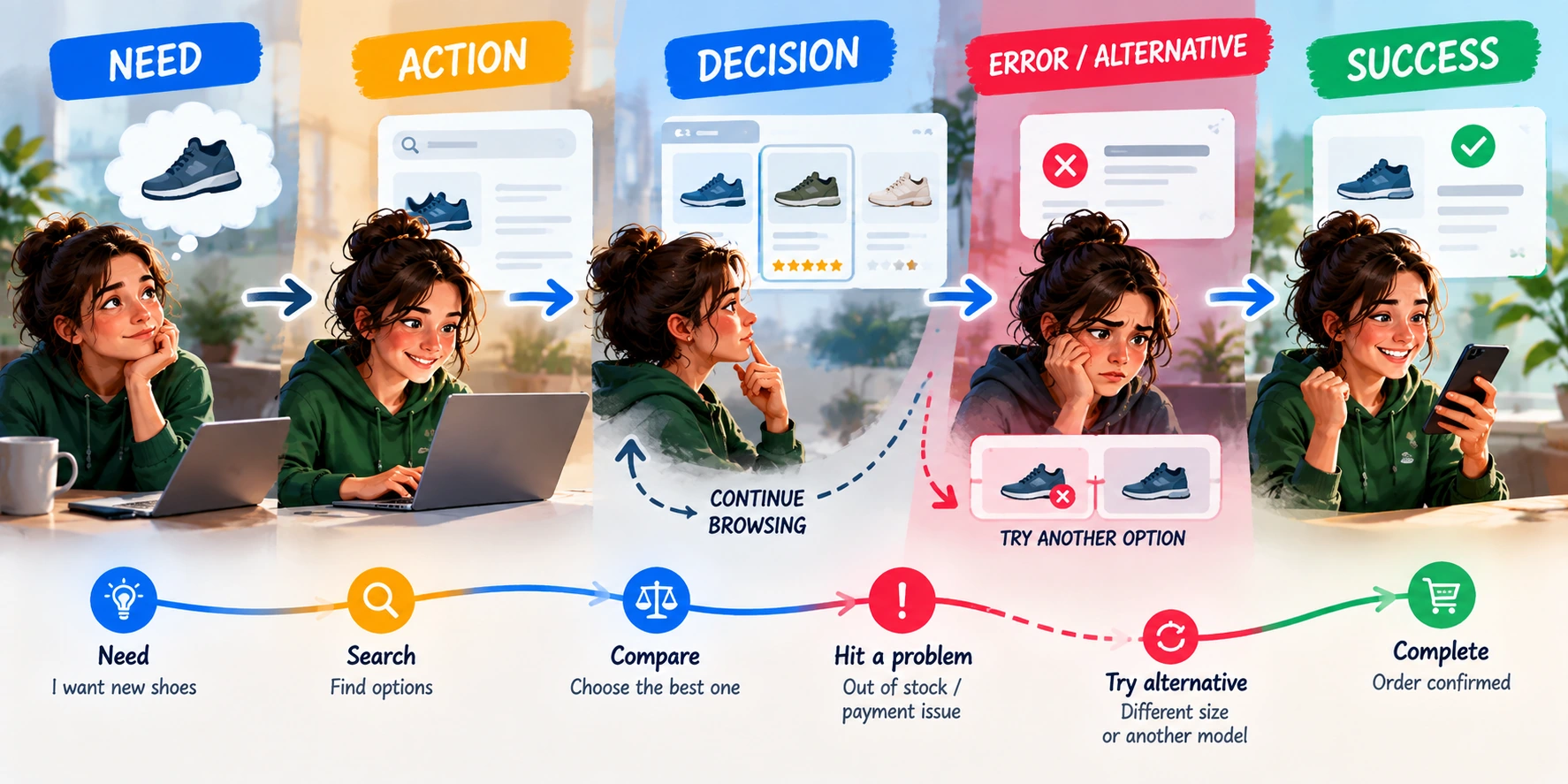
A scenario begins with the conditions the person finds themselves in and ends with their result. A screen is only one way of presenting what the product can do. The user may have a slow connection, lose access, get the date wrong, or discover that someone else has just booked the time.
A short scenario format:
- Who, and under what conditions: role, current state, permissions.
- Intent: what job the person is trying to get done.
- Main path: what they do and what changes they should see.
- Alternatives: what to do if the desired option is missing or the choice is unavailable.
- Completion: what evidence shows that the required work really happened.
"The page loaded" does not mean "the booking was rescheduled". For rescheduling, completion might be a saved new date, the old time left unchanged in case of failure, and a clear confirmation to the client. If sending the confirmation email temporarily fails, the document must explain whether the booking was saved and how the person can check its status. Otherwise the message may prompt the client to create a duplicate.
Krug: less uncertainty at every choice
User experience (UX) is the broader experience of getting a job done: from the first explanation to the result and the system's response. The user interface (UI) is the visible and controllable parts through which a person interacts with the product. A nicely styled form can still be a poor experience if its errors are unclear and the person loses what they typed after correcting one.
In his navigation example, Steve Krug draws attention not to a magic number of clicks but to the uncertainty in each choice: a clear link label gives confidence about where it leads. In his explanation, a difficult choice sometimes needs a short, timely and noticeable hint. This does not mean every professional task must be made simplistic or that all options must be hidden. It means helping the person make a decision without forcing them to guess what labels mean (Steve Krug, official excerpt on clarity of choice).
In the requirements, check whether a person can:
- quickly scan the heading, the action and any important warning;
- understand section names without the team's internal jargon;
- predict the consequence of an action before pressing anything;
- go back, correct data or cancel an action, where possible;
- complete the main scenario using the keyboard and with enlarged text;
- tell required fields from optional ones and understand the expected format of a value.
Real interfaces need to be observed with people from the relevant context. A designer's intuition, internal team agreement, interviews about past behaviour and prototype testing answer different questions. A spoken "I'd buy that" is not the same as paying, and success on a test task with invented data does not prove that the whole product solves the business problem. A prototype test shows whether a particular path is understandable, but it does not prove market value or willingness to pay; the limits of such conclusions are discussed in product discovery and client diagnosis.
Information architecture and navigation
Information architecture is the way content is grouped and named so that people can find the part of the product they need. A navigation requirement should answer three questions: where the person starts, where they go next, and how they understand where they have ended up. In text, this can be written as a hierarchy and a route without imposing a specific web address:
Client account
└── My bookings
    └── Booking details
        └── Change time
For the rescheduling scenario, the requirement might say: "From 'My bookings' the client opens an upcoming booking, sees its current time and status, and from the details goes to the available options. After saving, the system returns them to the details of the updated booking and shows a confirmation." A path such as /appointments/:id/reschedule is an implementation decision; it can be recorded separately if that address matters for an integration or for navigation.
Check the labels, the way back, and whether context is preserved after an error. A textual route is a hypothesis to test on a prototype, not proof of usability (Steve Krug, official excerpt on navigation).
Two public issues in Simpler Grants.gov, run by the US Department of Health and Human Services (HHS), describe different mismatches between expectation and the behaviour of a form. In one, the instructions for the Applicant Type field promised that a search result would be added by pressing Enter, but the option first had to be selected separately. In the other, an error in a date field also highlighted the already completed Applicant District field, so the person could not tell what actually needed fixing. These examples show why a requirement must describe the real step and its consequence; they say nothing about how common the problem is across all forms (Applicant Type, false error message).
States, accessibility and recovery from failure
Describe not only the finished screen but also what happens during transitions. Changing a booking may require these states:
| State | What the person needs to know | Possible next action |
|---|---|---|
| No bookings yet | Why the list is empty and what will appear here | Create a first booking or return to the service catalogue |
| Loading | That the system is still looking for available times | Wait, or cancel the search if that is safe |
| Success | Exactly which day and time are now saved | Return to the details or view the new booking |
| Input error | Which field has a problem and how to fix it | Go to the field and correct it; keep the rest of the data |
| Slot just taken | That the chosen time is no longer available and whether the old booking is still valid | See updated options or leave everything as it was |
| No permission | Why the action is unavailable for this account | Sign in to the right profile or contact an administrator |
| No response from the service | Whether the reschedule might have been saved | Check the status before resubmitting |
The request may have reached the server even if the browser did not receive confirmation; resubmitting it may create a duplicate. The requirement must provide for a status check, and the team will choose the technical protection against repeated submissions separately.
The World Wide Web Consortium (W3C) and its Web Accessibility Initiative (WAI) recommend associating fields with their labels programmatically, describing errors in text, and explaining how to fix them (WAI Forms Tutorial). For example, "That consultation time is already taken; please choose another. Your current booking has not been changed" tells the person far more than "Error 42".
The Web Content Accessibility Guidelines (WCAG) help turn accessibility into concrete scenarios: keyboard operation, a visible focus indicator, announced status messages and error messages in text (Keyboard, Focus Visible, Status Messages, Error Identification). One example or check does not prove full WCAG conformance. State separately what should happen to safe input data after an error.
Don't forget data, permissions and external constraints
For each important object, such as a booking, a payment or a profile, describe:
- who can create, view, change and delete it;
- which roles or consents are required;
- whether its state changes and what happens after cancellation;
- which external systems receive notifications;
- which language and time zone the person sees;
- what happens if an external system or the network is temporarily unavailable;
- which private or sensitive data this scenario does not need.
For rescheduling a meeting, this means recording the owner of the booking, the history of reschedules, the cancellation rule, and how the client and the administrator are notified. The PRD should reveal which product decision is needed and who must see the result, but it does not dictate the database structure in advance; the engineering team separately chooses a reliable way to implement it.
Tie quality requirements to context. "Always available", "maximally secure" or "responds instantly" do almost nothing to help a decision. Name the important scenario, the consequence of a failure, the target environment and the method of checking. If a target has not yet been set, record an open question, its owner and the next step instead of inventing a number.
A PRD alongside Shape Up
In Shape Up, Ryan Singer describes a short pitch: a proposal for a piece of work, used to decide whether to place a bet on it. Such a pitch connects the problem, the time allotted to the work (the appetite, a deliberate time limit), the core idea, the risky details and the no-gos, which are scenarios deliberately excluded (Shape Up: Write the Pitch). A PRD often records users, states, data, requirements, measures, dependencies and unknowns in more detail. These are different documents for different decisions; a team can use both or combine parts of them, but should not treat them as the same thing.
For example, a pitch might say: "We are allocating up to two weeks to self-service rescheduling of consultations that have not yet started. The first version has no group bookings or payment refunds." The PRD will specify who is allowed to take the action, what happens if the time has already been taken, how the confirmation is stored, and what data is needed. A time limit narrows the choices but does not define the full architecture; it pushes the team to consider fewer solutions.
This is an example of one particular way of working, not a universal norm. A small studio on a fixed-price contract, a regulated product and a team with changing requirements may all document work differently. What stays constant is the obligation not to hide assumptions and limits.
Agree the problem and limits before detailed design
Product discovery and client diagnosis covered diagnosis before recommendation and its limits. Here, check whether a new wish changes the problem, the scope, the price, the deadline or the contractual risks; record the new decision and who approved it. Diagnosis does not have to be a separate paid stage in every project. Nor does a PRD replace a legal review of the contract: where needed, bring in a specialist in payments, personal data or user rights.
In The Win Without Pitching Manifesto, Blair Enns emphasises diagnosis before prescription, specialisation, conversation instead of free complete design work, and early discussion of money and of whether the engagement is a good fit (the author's list of 12 proclamations). For a product team this is a useful reminder not to promise a solution before the problem and the conditions are understood. It is the author's position on selling professional services, not a rule that every preliminary discussion must be paid or that a client cannot be helped before a contract is signed.
In practice, this means agreeing separately on:
- the problem, the users and the desired result;
- the scope of paid diagnostic work and the conclusions it should deliver;
- what the team already knows, and which decisions remain with the client;
- which limits and assumptions have gone into the estimate;
- whether the new wish changes the price, the deadline or the contractual risks.
What to do with a draft prepared by AI
Artificial intelligence (AI) can group notes, suggest questions about an ambiguous statement, line up contradictions and prepare a draft table of requirements. It has not observed the client and does not become a source of truth about their behaviour; check facts against sources, and leave decisions to the responsible people.
A safe sequence is:
- Pass on only records you are permitted to use; remove personal data if it is not needed.
- Ask it to separate verbatim testimony, observation, conclusion and assumption, and to keep a link to the source.
- Mark contradictions and gaps with questions rather than filling them with invented answers.
- Check every stated fact against the original notes, system data or the responsible person.
- Leave the decision to the product owner and the relevant specialists.
An example prompt: "Group the notes provided about rescheduling consultations. For each statement, show the source excerpt, the type of evidence, an alternative explanation and what is unknown. Do not add invented quotations, frequencies or market conclusions." If the response produces "nine out of ten clients want a mobile app" but the material contains no such count, that figure must not make its way into the PRD.
In its help article on data analysis in ChatGPT, OpenAI describes working with uploaded files and advises checking the code, the result and the assumptions when the analysis is carried out by code (Data analysis with ChatGPT). Supported file types may depend on the model, the plan, the workspace settings and the account's capabilities; that caveat applies specifically to file support. This is a particular ChatGPT feature, not a guarantee of access in every interface and not a reason to accept a conclusion without checking it.
As anecdotal context: in a nested reply in an r/ProductManagement discussion, one participant says they used a model to produce a first draft of a Jobs To Be Done map, which still had to be validated through conversations with users. This is one commenter's account of their own practice, not research into the quality of the method and not proof that a generated map accurately reflects people's needs. It merely illustrates the difference between a draft to be tested and a confirmed requirement. The reply of 15 March 2026.
Worked example 1: rescheduling a booking
Situation. The owner of a training studio asks to "add a button to reschedule a consultation". This is an invented example; it does not describe a real company or a piece of research.
What is known. The notional brief states that reschedules are currently agreed by phone. Who exactly does this work, how often it happens, whether calls are missed, and whether clients want to change the time themselves are all unknown. Until confirmed, these are hypotheses, not measured facts.
The problem to test. "A client who cannot come at the original time has no simple way to find and confirm another available time without repeated manual coordination."
Roles. The client asks for the change; the administrator keeps the schedule; the studio owner is responsible for the rules and the result; the booking system determines the available slots. The person who pays for development may not be the person who reschedules the meeting.
Goal. Enable the client to find an acceptable alternative and end up with a single valid booking. There is as yet no baseline measurement of manual requests and no target measure. The owner must agree how to collect the baseline and how to tell whether the new process actually helps.
Outcome versus shipped feature. The existence of a rescheduling page is the team's output, not proof of value. The outcome for the client might be a completed reschedule without a repeat call to the administrator. To test this hypothesis, the team first establishes a baseline, then after launch counts the proportion of time-change requests that clients completed on their own, and separately tracks failed attempts and erroneous changes. The period, the data source and an acceptable target remain open until the owner agrees them; success must not be invented from the number of screens shipped. This applies Marty Cagan's framework: alongside technical feasibility and usability, you check value for the client and viability for the business (Cagan, "The Four Big Risks").
Scenario.
- The client opens a personal booking that has already been confirmed.
- The system shows whether the rescheduling rules allow this booking to be changed.
- The client browses the free times and chooses one.
- The system checks once more that the time is available before changing the booking.
- If the time is still free, the system saves the new time and shows it together with the next steps.
- If the time has just been taken, the old booking remains valid and the client sees updated options.
- If the booking cannot be changed, the system explains why and how to contact the studio.
Requirements and traceability. The table links each rule to a way of checking it and an example of the next task. These are teaching identifiers: when a criterion changes, update the links in both directions so that you can get from a task back to the requirement and its source. Acceptance criteria are covered in more detail in acceptance criteria and evidence. In the table, AC stands for an acceptance criterion and T for an implementation task.
| ID | Requirement and basis | Check and next task |
|---|---|---|
| R1 | The client sees only their own booking that is allowed to be changed; the rule is confirmed by the product owner | AC-01: check ownership and the right to change; T-01: owner and access check |
| R2 | Before saving, the system checks the free time again so as not to create a double booking | AC-02: the time is free at the moment of saving; T-02: repeat check in the booking service |
| R3 | If the time has already been taken, the old booking remains valid and the client sees other options | AC-03: confirm the old booking is kept and alternatives are shown; T-03: conflict handling |
| R4 | After success, the client and the administrator see the same new time; notification channels still need to be checked | AC-04: both see a consistent time; T-04: determine the source of state and notifications |
| R5 | The time is shown in the time zone defined for the client; the rule must be agreed by the owner | AC-05: verify the confirmed time; T-05: check display in the required zone |
If one requirement is split into several subtasks, each must refer to the corresponding criterion. When a criterion changes, update both ends of the link; it must also be possible to get from a task back to the requirement and its source.
Keep a log of unresolved conflicts separate from the agreed requirements. For example: C-01 — status: open; sources: the branch specification says "only the assigned specialist", the export document says "all staff"; affected requirement: R1; owner: the data owner; next step: confirm the current policy before estimating the task. Until there is an answer, do not write both options into R1 as accepted, and do not treat the access criterion as ready.
Limits. Not yet included: group meetings, changing the specialist, rescheduling after the consultation has started, and refunds. These exceptions will need to be clarified if discovery confirms they matter.
Risks and open questions. The cut-off time for rescheduling, the available confirmation channels and the cancellation policy still need to be agreed. If the email does not arrive, the client needs another way to check whether the change was saved.
Decision. After the rules are confirmed and clients and the administrator have been observed, the team can build self-service rescheduling, simplify the request to the administrator, or drop automation altogether if the problem is rare.
Worked example 2: messages in a registration form
Situation. A person is registering for an online seminar and has not entered an email address. This is an invented example; it shows how a form requirement describes not only the text but also recovery.
| Option | Text and behaviour | What remains unclear |
|---|---|---|
| A | A "Submit" button; after submission, "Error 42" | Whether registration was completed, which field to fix and what to do next |
| B | After an attempt without an address, an associated message appears next to the "Email" field: "Enter your address so we can send you the seminar link"; other safe data is kept and the form is not submitted | The reason and the next action are clear before the next attempt |
Record that the error is associated with the field and explained in text, that safe input data is kept, and that keyboard focus moves to the problem. While submitting, show that the system is working and prevent accidental resubmission.
Add explicit requirements: every field has a visible, understandable label, and a hint explains any non-obvious format; an error names the field and the reason and suggests the next step if it is known; it is conveyed in text, not only by red colour; after a failed submission, safe input data is preserved; keyboard focus moves to the problem or to an error summary. W3C WAI describes associated labels, textual identification of errors and notification of the submission result. These properties can be checked manually and with assistive technologies, but such a list is not a full accessibility audit.
If the connection drops after submission, the system may already have created the registration. Do not claim that it was not saved: give the person a way to check the status before trying again, so as not to create a duplicate.
Decision. The PRD records the messages, preservation of state and keyboard behaviour. The designer chooses the presentation, the engineer verifies the actual state of the system, and people work through the task in a prototype or the finished feature. The example on its own does not prove that the text is clear to everyone.
Worked example 3: a request to add payment to a course catalogue
Situation. In an invented online learning service, the client asks to add payment before access to the materials. The original scope covered a course catalogue and registration; now the team has to establish whether this is a new need, a new business model, or a wish outside the limits of the first launch.
Diagnosis. The team clarifies: which materials are paid for, and when does access open? Is payment one-off or recurring? Who receives the money, processes refunds and reconciles the accounts? Has a payment provider been chosen and a method of integration agreed?
The questions depend on the original problem. If payment relates to a consultation that has already been booked, find out whether booking without prepayment is possible, whether prepayment is meant to reduce no-shows or simplify cash handling, and how cancellations and refunds work. If it concerns a course, clarify when the materials open, how long access lasts, and what happens after a failed or duplicate payment. In both cases you need a business decision, rules of responsibility and separate criteria, not just a payment button.
The updated document.
| Part | State before the new request | What changes |
|---|---|---|
| Problem | Help a person find and view the right course | Decide which materials are paid for and when access opens |
| Roles | Learner and catalogue owner | Add a staff member who reconciles payments, and the payment provider |
| Data | Course, description, registration | Add amount, currency, transaction status and the need for refunds |
| Risks | The person cannot find or understand the course | Add double charging, failed payment, refunds, privacy and accounting |
| Scope | Catalogue and registration | Payment, integration, access rules and timelines must be agreed separately |
Decision. Do not add payment silently. The owner can postpone it beyond the first version, or revise the scope and timeline if both needs matter. A prototype will help compare the rules, but it will not replace legal, accounting and technical review. Even if AI makes writing code cheaper, decisions about money, refunds, responsibility and risk remain with people.
Scope affects not just the feature list but also roles, data, integrations, responsibility and success criteria. If the goal of the first stage is to test the catalogue and registration, payment can be explicitly placed outside the first version. If both problems are critical, the team revisits the agreement, the risk and the timeline together, rather than slipping the payment integration in as an inconspicuous line item.
In brief
A PRD helps the team understand the problem, the result, the roles, the scenarios, the constraints, the limits and the unknowns. It must not pass off a technology choice as a user need or turn a hypothesis into a fact. Describe both errors and recovery from errors; do not treat a screen loading as proof of a successful scenario. Build UX, accessibility and business limits into the requirements from the start. When the request changes, update the reason, the risks and the scope before making a new promise.
Sources and further reading
- Steve Krug, Don't Make Me Think, Revisited: A Common Sense Approach to Web (and Mobile) Usability, New Riders, 2014, 3rd edition. The author's page about the book and the official excerpt "Animal, Vegetable, or Mineral?", read on 23 September 2026. Used for the specific principle of clarity in each choice rather than a magic number of clicks; the full book is not claimed as read here. The author's page describes the third edition as current.
- Marty Cagan, "The Four Big Risks", Silicon Valley Product Group, 4 December 2017; read on 23 September 2026. Used for the framework of value, usability, technical feasibility and business viability; this is the author's article, not a substitute for reading Inspired in full.
- Blair Enns, The Win Without Pitching Manifesto, the author's page listing the 12 proclamations; read on 23 September 2026. Used for the themes of specialisation, diagnosis before prescription, the limits of free problem-solving and early conversations about money; this is the author's position for expert services, not a universal requirement for every contract.
- Ryan Singer, Shape Up: Stop Running in Circles and Ship Work that Matters, Basecamp's online book, accessed 23 September 2026; in particular "Write the Pitch". Used for the distinction between problem, appetite, solution, risky details and no-gos in a pitch; presented as a specific Basecamp method, not the only standard for a PRD.
- World Wide Web Consortium, Web Accessibility Initiative (W3C WAI), Forms Tutorial (updated 27 March 2026), User Notification, and WCAG 2.2 on Keyboard, Focus Visible, Status Messages and Error Identification; read on 23 September 2026. Used for requirements on labels, the keyboard, visible focus, textual errors and success notification; a single check does not certify full WCAG conformance.
- GitHub, HHS, Issue #6197: "SF-424: Fix usability issue from Applicant Type box", 2 September 2025, and Issue #6194: "[BUG] False error message in form UI", 29 August 2025; read on 23 September 2026. Used as concrete records of a mismatch between instructions and interaction and of a wrongly flagged field; this is the context of a single product, not a measure of how widespread such problems are.
- Teresa Torres, "Taking Continuous Discovery to the Next Level at SEEK", Product Talk, 10 April 2019; read on 23 September 2026. The author describes the interviews of a team she coached; this is an example of her self-report about a process change, not a controlled study of effectiveness.
- Reddit, r/ProductManagement, a nested reply about a draft Jobs To Be Done map in a discussion about product research, 15 March 2026; read on 23 September 2026. One commenter describes a model-generated first version of a map that still had to be validated through conversations. This is a self-description, not proof that the method works or a generalisation about the community.
- OpenAI, "Data analysis with ChatGPT", Help Center article; read on 23 September 2026. Used for the description of file analysis and the recommendation to check code, results and assumptions; format support may depend on the model, plan, workspace settings and account.